Claw DSP · Sketch · From the studio
Three session problems. One curve.
I’m an audio nerd. Few things excite me more than turning an idea I’ve carried in my head into a real tool. Sketch came from three problems that broke my sessions every week.
Two reading levels · Level 1 · 4 min · full read · 5 min
Open “Open the hood” in any section for the technical detail.
— 01
I bought a whole toolkit. I use one technique.
I was forcing a curve-first workflow into transient work: Shaperbox in multiband for kicks and snares with hot mids. The useful part wasn’t EQ or compression; it was drawing the envelope itself, because the problem moves inside the hit. Right technique. The tool had another job.
Using a tool for something it wasn’t built for always costs you. It costs you workflow.
— 02
The plugin sounded right. The session stopped moving.
Latency. Clean a kick and snare and I can’t track a synth over them or record vocals in the same project. On my old machine presets wouldn’t load and took thirty seconds to open. The decision goes logistical, not musical — logistics kill records.
If a tool makes you choose between the sound and being able to keep recording, the choice is already wrong.
Open the hood
For the record, as data and not a complaint: Sketch’s shaper lookahead is 38 samples in LOW and 202 samples HIGH at 48 kHz. Linear phase adds 256 samples on reconstruction, and the ceiling’s oversampling can add its own. Numbers, not promises — and never a comparison with anyone.
— 03
I own six transient shapers. I always try three.
TransX works beautifully on some kicks. On others I reach for Neutron, Transient Master or the SPL — not because one is wrong, but because every detector reacts to the material. I knew exactly how each one behaved and still tried three until one landed. I wanted the trigger to be explicit and the response to be mine.
The detector decides when. The curve determines what happens next — and that part is yours.
Open the hood
Classic shapers detect transients from the material, so their response naturally moves with it. Sketch uses a custom absolute-threshold detector with Focus (20 Hz–20 kHz), Sens (0–1), Detail, Hold and Trigger Shift, and LEARN can set them for you. The detector decides when. The curve you draw decides what happens next.
— 04
The curve solved the shaping. Clipping became the finishing decision.
A static ceiling clips everything that crosses it. On the records I love, the useful distortion feels placed: body or transient, lows or brightness. Sketch places the clip stage directly after the drawn envelope, so the curve determines what reaches it and when. Its three active modes are Soft Clip, Hard Red and Clean.
Draw the gain. Hit a fixed clip stage.
Clipping can be a decision in time, not just level.
Open the hood
I learned to push a transient into a limiter to shape it. Sketch places the clip stage directly after the drawn envelope, so the curve determines what reaches it and when. The output menu is Off / Soft Clip / Hard Red / Clean; its three active modes are Soft Clip with real color — my own reference was the saturation I know from FL Studio’s soft clipper — Hard Red with more character (and its Clip Intensity), and Clean, calmer. With 1×/2×/4× oversampling and a DC filter.
— 05
Three problems. One primitive.
The sound-shaping problems converged on one move: draw the envelope and let Sketch trigger it on each detected transient. Multiband decides where in the spectrum. The detector decides when the curve starts; you decide its shape. The ceiling after the curve determines when the shaped signal enters clipping.
One cause. Two decisions. One result.
“I didn’t invent the transient shaper or the clipper. What I’m proud of is turning a way of working I’d carried in my head for years into a real tool.”
Sketch isn’t three plugins in one. It’s one plugin doing what I used to do with three.
— 06
From complaint to control.
Sketch didn’t begin as a feature list. Each control is a decision I wanted to make directly. Tap a row to see how it works.
Choose a band. Drag its points vertically.
Every control turns a studio frustration into a decision you can make yourself.
— 07
I already knew what to draw. That was the problem.
The hard part was turning it into something another producer could learn without me. Factory curves teach the language; your library saves your curves and brings them back in a click. MAIN anchors the Curve Sequencer; seven editable positions build controlled movement around it. Humanize varies Amount; Character loosens timing by up to 5 ms. The design had to teach without lecturing.
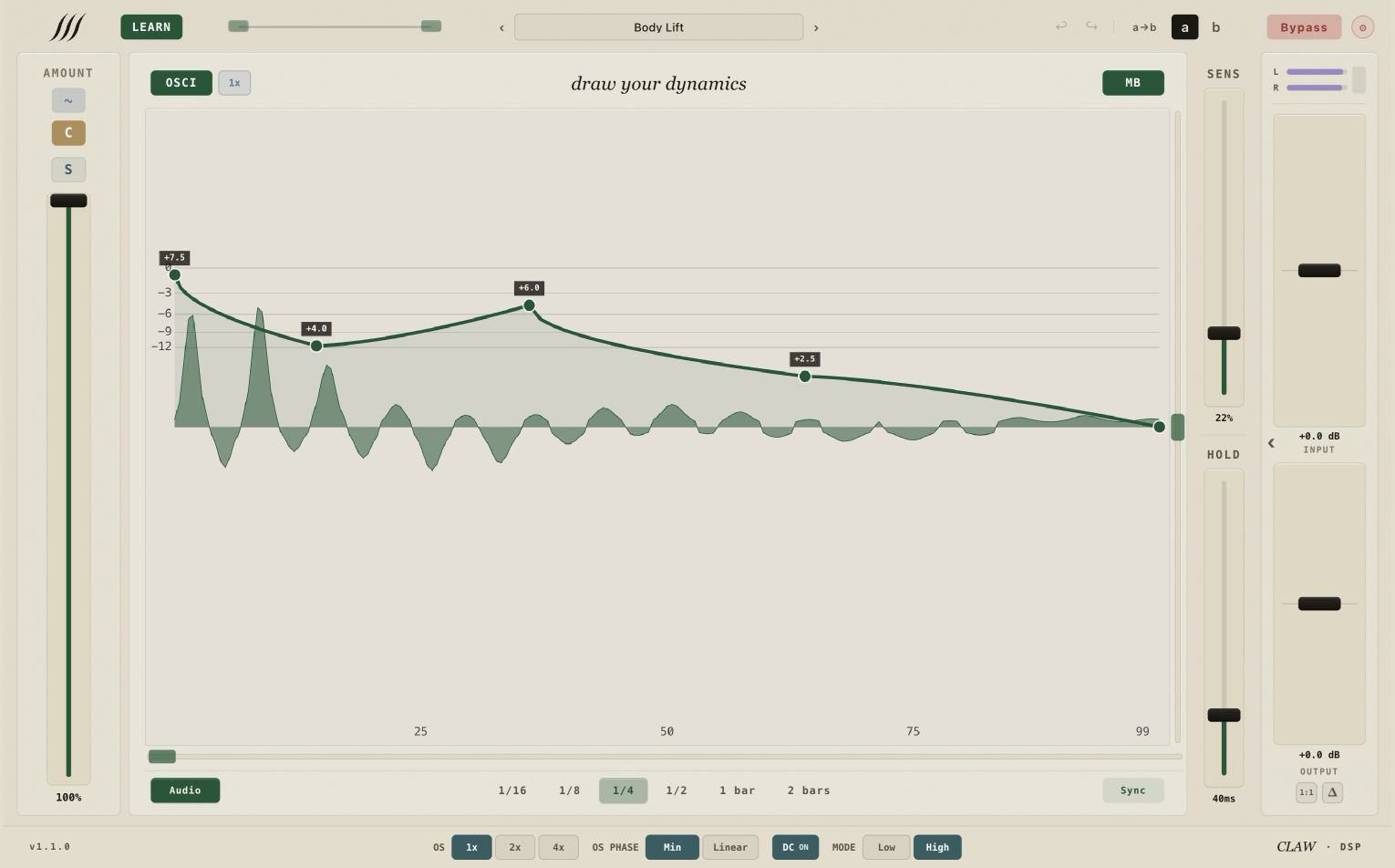
A factory curve should do more than sound good. It should show you how the tool thinks.
— 08
It sounds good in minute one. Mastering it takes longer.
I’m not selling Sketch as a magic preset. Getting a sound fast is easy; getting everything out of it isn’t. The curve is immediate. Multiband, your library, the sequencer, the ceiling and Humanize reward practice. It’s a different tool, so it has a learning curve. That’s why the full version is yours for 21 days.
If a page has to convince you, run it for 21 days instead. Fairer to both of us.
— 09
You can draw your audio’s dynamics by hand.
Sketch combines an absolute-threshold detector with a response you can see and draw. Focus aims detection toward the frequency region you care about; the curve shapes what happens next. Work per band, save curves to your library, sequence seven bounded variations with MAIN still live, humanize repeated hits and choose the clip-stage finish — all in the same visual language. The point isn’t more controls. It’s making the response in your head tangible.
- I bought a whole toolkit for one technique: drawing the envelope of the mids.
- Latency kept me from recording in the same session.
- Transient shapers depend on the signal, so I always tried three.
- A static ceiling clips what reaches it; the curve decides what does.
- One drawable envelope brought those decisions into a single tool. That’s Sketch.