Skip to content
Plugins/Sketch
v1.1.4 · Mac & Windows
Multiband Transient Shaper

Sketch.

Your drums deserve more than two knobs. The first transient shaper you draw and sequence — hit by hit, band by band.

Mode
Single / 3-bandMultiband crossover · Linear-phase option
Envelope
DrawableCurve nodes · per-segment shape · Height / Flip · Link Bands
Detector
LEARN focusAbsolute-threshold · Sens 0–1 · Hold 20–500 ms
Trigger
Audio / SyncExternal SC · DAW PPQ · Humanize
sketch · $47 · buy → sketch · $47 · buy → sketch · $47 · buy → sketch · $47 · buy → sketch · $47 · buy → sketch · $47 · buy → sketch · $47 · buy → sketch · $47 · buy →
01—05 / WHY SKETCH

Five reasons to stop dialing blind.

Sketch turns transient shaping into something you can see, vary, reuse and finish—without building the same move again on every hit.

01Drawable transient shaper

Draw the punch. Every accepted hit follows.

Pull curve nodes into the gain shape you want, then shape each segment. Above 0 dB adds attack and body; below 0 dB pulls sustain down. Every accepted trigger fires the visible contour, scaled by Amount.

  • DRAWCurve nodes + segment shape
  • GAINAbove adds · below reduces
  • SHAPEHeight · Flip · Length

Stop translating a sound in your head into attack and release knobs. Draw the move itself.
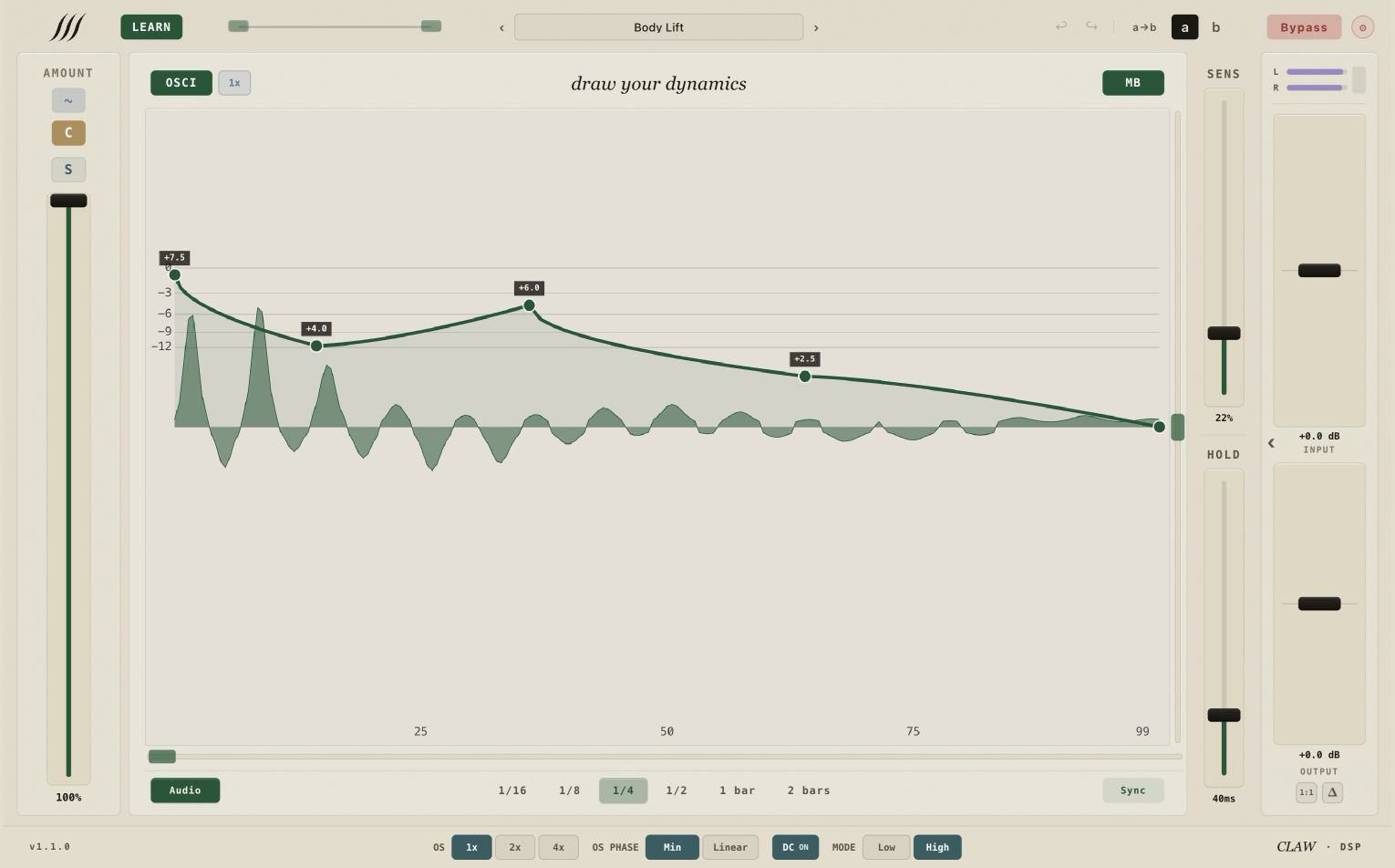
Sketch 1.1.1 — day-mode single-band view with the Just Upward factory preset and a real processed waveform
02Curve Sequencer

Shape hit after hit. Keep the feel.

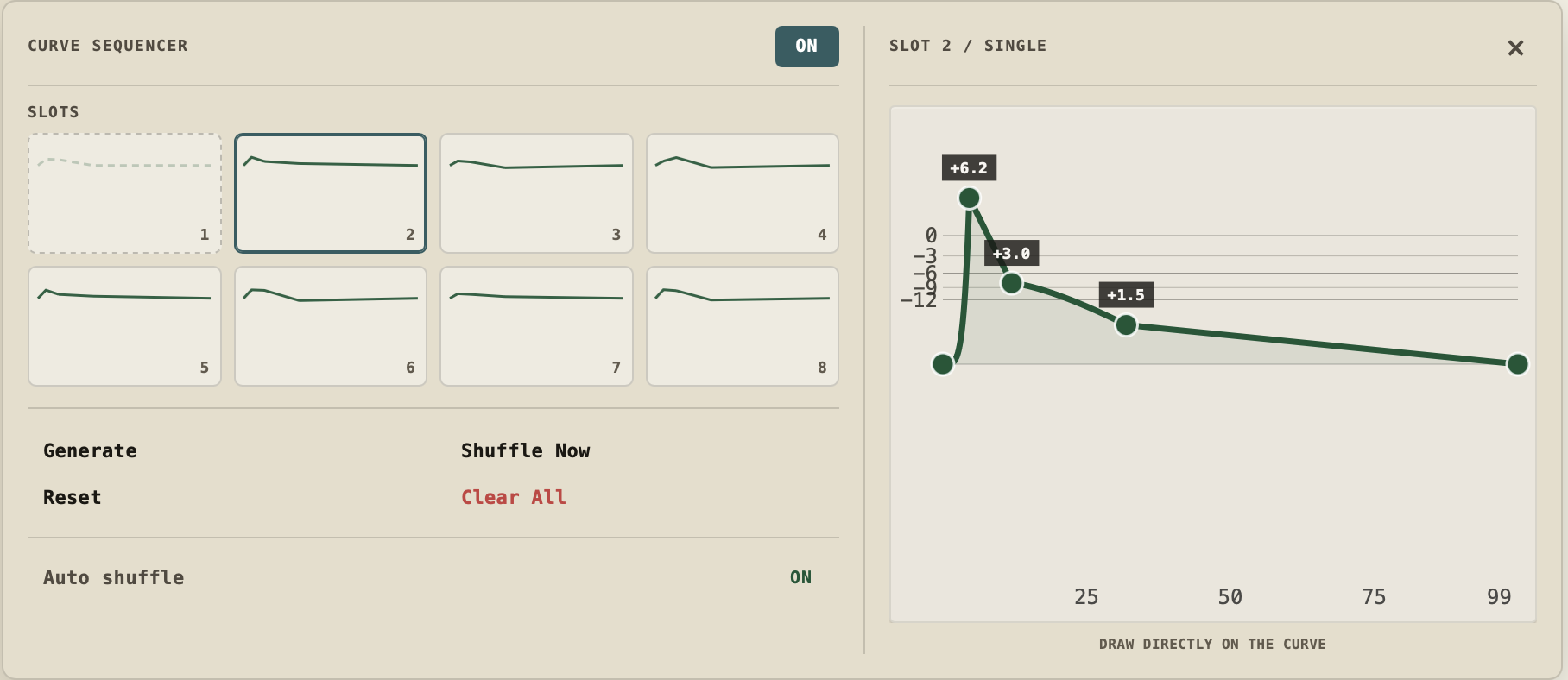
MAIN stays live and permanently bound in position 1. Generate builds seven bounded variations in positions 2–8 while preserving timing, segment shape and slider states—so the part keeps evolving without redrawing a single curve.

  • ROTATEMAIN + 7 editable
  • GENERATEBounded variations
  • PRESERVETiming · shape · sliders

Variation without redrawing seven curves—or turning the performance into uncontrolled randomness.

CURVE SEQUENCERMAIN + 07
Real Curve Sequencer structure · MAIN locked in position 1 with seven editable positions.
ACCEPTED TRIGGER
MAINlinked
NEXT POSITIONeditable
Real Curve Sequencer structure · MAIN locked in position 1 with seven editable positions.
03Humanize + Character

Vary the feel. Not the part.

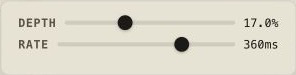
Two controls add life on top of the drawn move. Humanize varies the global Amount over time by Depth and Rate. Character adds a fresh random trigger delay of up to 5 ms, so no two accepted hits land in exactly the same place.

  • HUMANIZEGlobal Amount · Depth + Rate
  • CHARACTERFresh 0–5 ms trigger delay
  • PER HITApplied on each accepted trigger

Movement without randomness taking over—the curve you drew still runs the show.

ACCEPTED TRIGGER
HumanizeDepth · Rate
Varies global Amount by Depth and Rate.

Varies global Amount by Depth and Rate.

Character0–5 ms offset
Adds a fresh random trigger delay, up to 5 ms.

Adds a fresh random trigger delay, up to 5 ms.

SHAPED OUTPUT
Real Humanize and Character controls on one feel path · amount first, then timing, per accepted trigger.
04Curve Library

Keep the shape. Skip the rebuild.

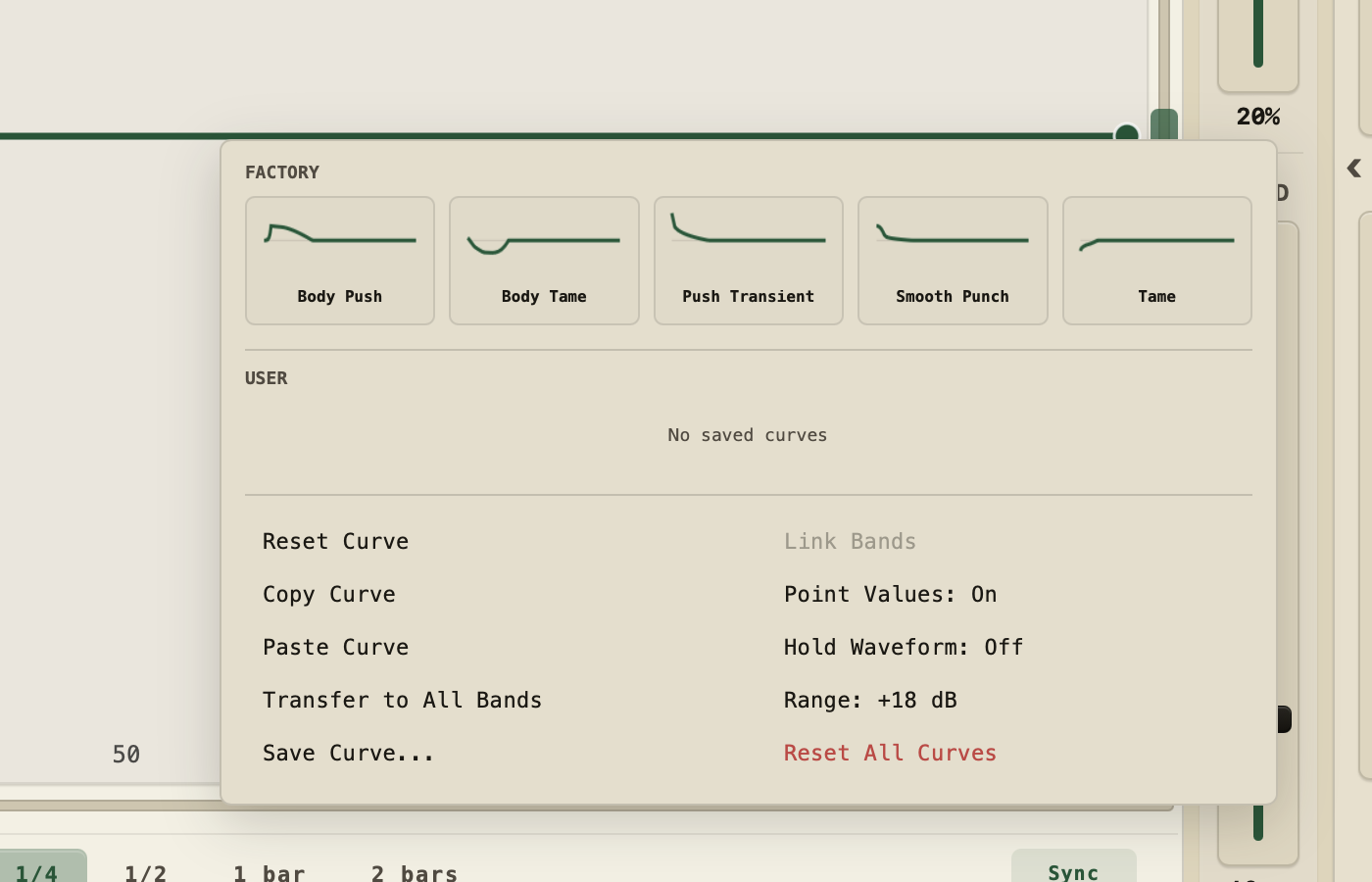
Start from five factory contours, save the curves worth repeating and move them where the session needs them: between bands or straight into sequencer slots 2–8.

  • START5 factory curves
  • SAVERename · delete
  • MOVECopy · paste · transfer

The curve that fixed this kick is ready for the next one—without starting from a blank canvas.

CURVE LIBRARY05 factory starting points
Sketch 1.1.1 Curve Library menu open over the day-mode canvas, listing the factory and saved curve entries.
  • factory
  • 01Body Push
  • 02Body Tame
  • 03Push Transient
  • 04Smooth Punch
  • 05Tame
YOUR CURVESSave · Rename · Delete
MOVE THE SHAPECopy · Paste · Transfer to All Bands
SEQUENCERImport to slots 2–8
Factory curves and current library operations · no legacy menu artwork.
05Three clip modes

Push the transient. Choose the finish.

Soft Clip rounds the crest toward its ceiling. Hard Red adds the tonal path, with Clip Intensity morphing how much of that serial character is applied. Clean keeps the strict hard clamp without the extra tone.

  • SOFTRounded catch
  • HARD REDTonal path + morph
  • CLEANStrict clamp

Three deliberate finishes after the transient move—not one generic clip switch. Off remains available when you want none.

SOFT LIMITCURVE

Soft Clip

Rounds the signal toward the ceiling.

TONE + MORPHSERIAL PATH

Hard Red

Adds the tonal path; Clip Intensity morphs how much of that serial character is applied.

Clip Intensity
STRICT CLAMPCEILING

Clean

The hard ceiling without the extra tone.

OFF

No ceiling processing. Oversampling and phase controls remain separate.

Signal-path explanation, not a replica of the plugin UI · Hard Red and Clean share the hard-clamp geometry at full intensity.
— 01 / Drawable Envelope

Draw the curve. Every accepted hit.

Set the trigger, then pull curve nodes into the gain shape you want and shape each segment. Above 0 dB adds gain; below 0 dB reduces it. Every accepted trigger fires the visible contour, scaled by Amount. Height moves the curve vertically, Flip interpolates toward its vertical mirror, and Length sets the time window. Link Bands is a context-menu action that copies the current curve to all bands and propagates later curve edits.

  1. 01 Point
  2. 02 Shape
  3. 03 Fire
  • aDrawable canvas — curve nodes + per-segment shape · positive above 0 dB, negative below · undo / redo up to 20 states
  • bHeight / Flip — shift vertically · mirror within gain range
  • cLength — set the time window each accepted hit follows
  • dLink Bands — copy the full curve · propagate later edits
— 02 / Multiband Split

One curve per band. Stacked on every accepted hit.

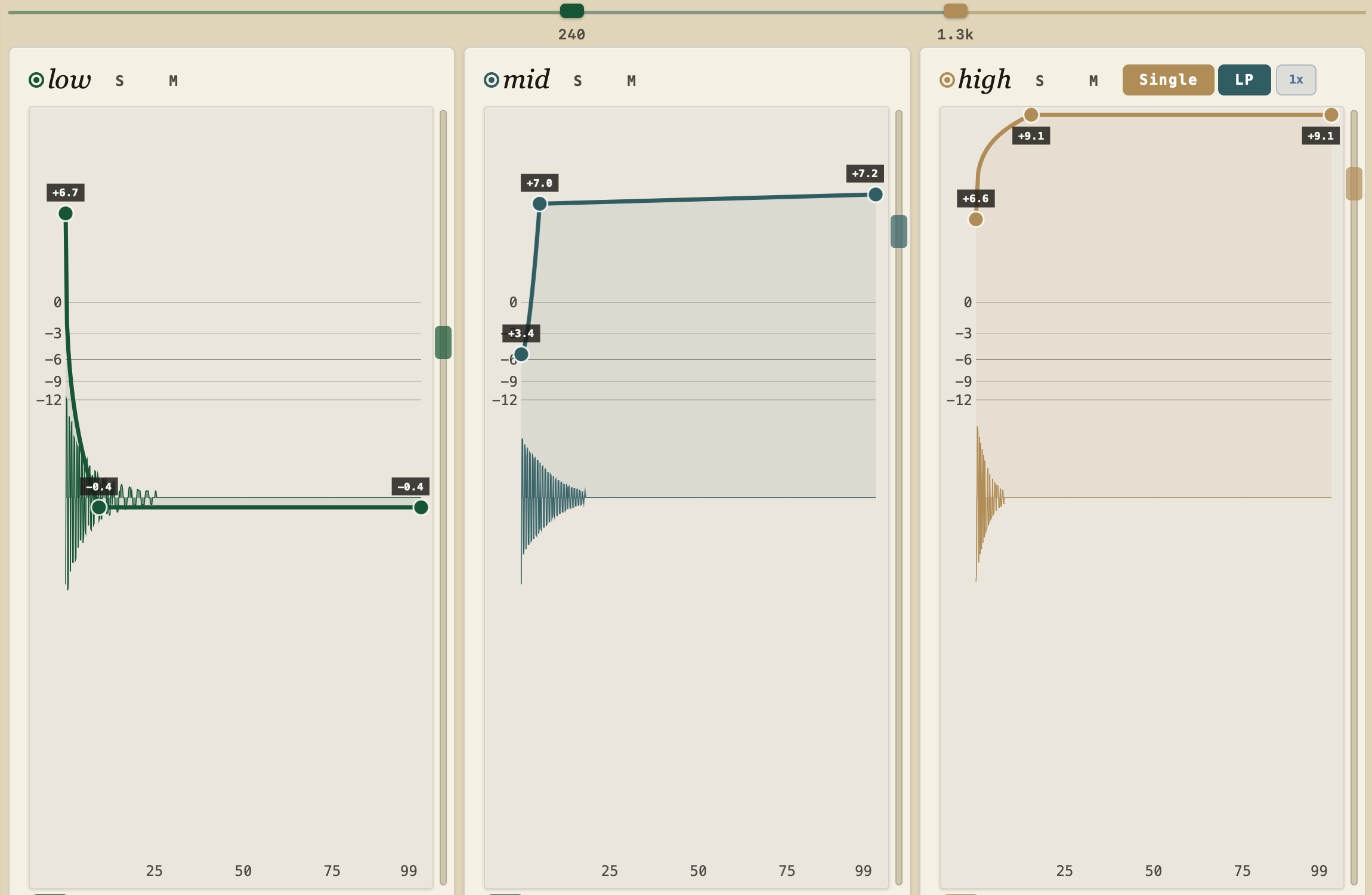
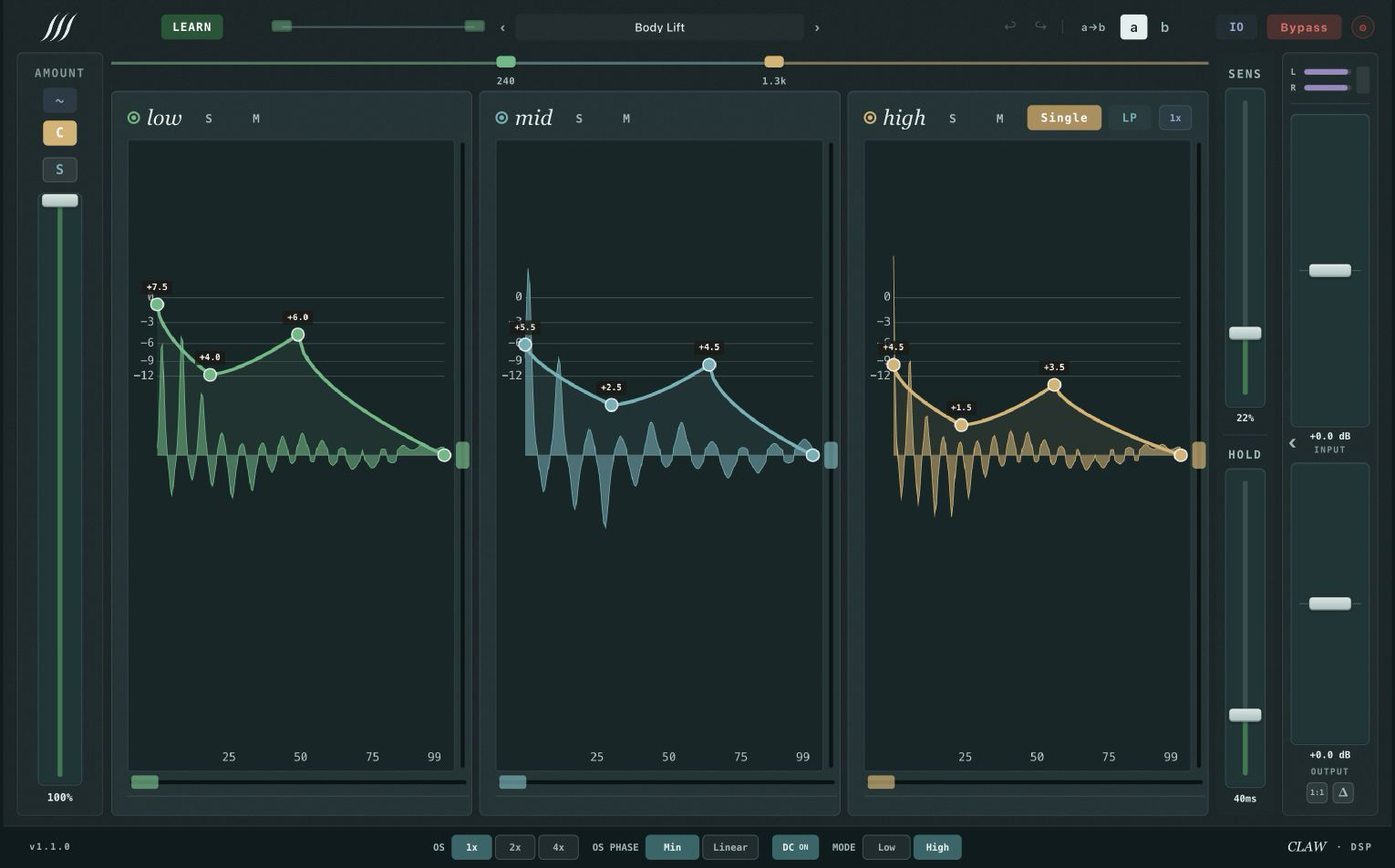
Flip MB and Sketch splits the signal into low, mid and high — each with its own drawable envelope, solo, mute and effect bypass. Draw a positive attack on the low band, pull the sustain down on the high band, or any mix in between. Detector, Focus, Audio / Sync mode and musical division stay shared so each accepted trigger advances once and lands together across low, mid and high. Pick minimum phase for a unity-magnitude all-pass sum, or linear phase for latency-matched reconstruction of the input.

Sketch 1.1.1 Multiband view in day mode: the low, mid and high bands each open their own drawable envelope editor side by side.
  • a3-band crossover — separate curve per low / mid / high · LP: reconstructs input exactly · min-phase: unity all-pass
  • bLinear-phase mode — shaper only: adds 256 samples; ~6.1 ms LOW / ~9.5 ms HIGH total @ 48 kHz, before clipper oversampling
  • cPer-band solo / mute — A/B with copy A→B
  • dEffect bypass per band — audio passes, shaper off
— 03 / LEARN Detector

Knows what's a hit. And what isn't.

A shortcut when the detector needs a nudge. Hit LEARN, play a representative passage, and when confidence is enough Sketch updates Focus, Sens, Detail, Hold and Trigger Shift for you. Its absolute-threshold detector uses 38 samples of lookahead in LOW quality and 202 in HIGH at 48 kHz. Detail adds a guard against the local mean to help reject quieter local fluctuations. Character adds 0–5 ms of trigger timing variation for feel.

Explore the manual
  1. 01Listen
  2. 02Detect
  3. 03Set
  4. 04Refine
  • aLEARN — updates Focus · Sens · Detail · Hold · Trigger Shift
  • bSens + Detail — absolute threshold · local-mean guard
  • cHold + Shift — 20–500 ms lockout · trigger placement
  • dHumanize + Character — amount variation · 0–5 ms trigger timing
/04

Specifications

Sketch · v1.1.4
Envelope
EditorDrawable curve nodes + per-segment shape
Y range−60 dB → +9 / +18 dB
Per-bandCurve · Height · Flip · solo · mute · effect bypass
A / BPer-instance, with copy A→B
Undo / redoUp to 20 in-plugin states
Detector
TypeAbsolute-threshold
Sens0–1 · ~−10 to −20 dBFS
Hold20–500 ms (log) · ≥60 ms retrigger
Focus20 Hz – 20 kHz tunable
External SCStereo, falls back to main
Crossover
ModesSingle · 3-band
Defaults240 Hz / 1.3 kHz
Shaper lookaheadLOW 38 · HIGH 202 samples @ 48 kHz
Linear phaseShaper only: +256 samples; ~6.1 ms LOW / ~9.5 ms HIGH total @ 48 kHz, before clipper OS
Output finishOff · Soft Clip · Hard Red · Clean
Compatibility
macOSApple Silicon · VST3 · AU
WindowsWindows 10/11 · x64 · VST3 · Early Access — not code-signed; verify SHA-256 before SmartScreen: More info → Run anyway
Clipper OS1× · 2× · 4× · minimum / linear phase
Internal32-bit float
ActivationNo iLok · 2 machines
— Use cases

One plugin. Six ways to shape a transient.

/01

Drum bus

Multiband: shape the low-band attack and high-band sustain independently. Try a short positive low-band lift when the kick needs more punch. Bypass and level-match often — the useful amount depends on the kit and balance.

/02

Snare top

Draw a short positive attack around the trigger and return toward unity over roughly 40 ms. Adjust the gain and timing to the mic, drummer and song, then level-match against bypass.

/03

Kick

Multiband: sharpen the low-band attack with a short positive curve, leave the sustain near unity. Keep the Amount modest and level-match against bypass so louder never reads as better.

/04

Hats

On the high band, a small positive lift on the attack sharpens the stick. If the tail rings on, pull the sustain gently before pushing the Amount. Bypass often — hats forgive very little.

/05

Percussion

Sync at 1/16 with a mild positive attack on the mid band. If closely-spaced hits start to stack, ease the Amount before touching the timing. Level-match on every change.

/06

808

Low band only: a short positive attack, sustain near unity. Level-match against bypass — long sub tails are easy to over-shorten and lose weight without noticing.

— Get Sketch

Draw the transients. Ship the mix.

Get the full version for $47. One-time license, up to two activations, a 21-day full-version trial and 30 days to refund — no card to try, no subscription to cancel.

Statusv1.1.4 · Mac & Windows
LicenseOne-time purchase
ActivationUp to 2 machines — manage from your account
OfflineWorks offline for up to 30 days between validations
Refund30 days, no questions
Supportsupport@clawdsp.com
Sketch.v1.1.4
$47USD · one-time
21-day trial · 30-day refund · No subscription
  • Single + Multiband modes — linear-phase option
  • Drawable envelope canvas — Height / Flip / Link Bands
  • Absolute-threshold LEARN detector with Detail guard
  • Audio + Sync trigger modes — external sidechain
  • Humanize amount variation + Character trigger timing
  • Output finish — Off / Soft Clip / Hard Red / Clean
  • Formats: Mac & Windows
Secure checkout · Access from account · Full-version trial, no card